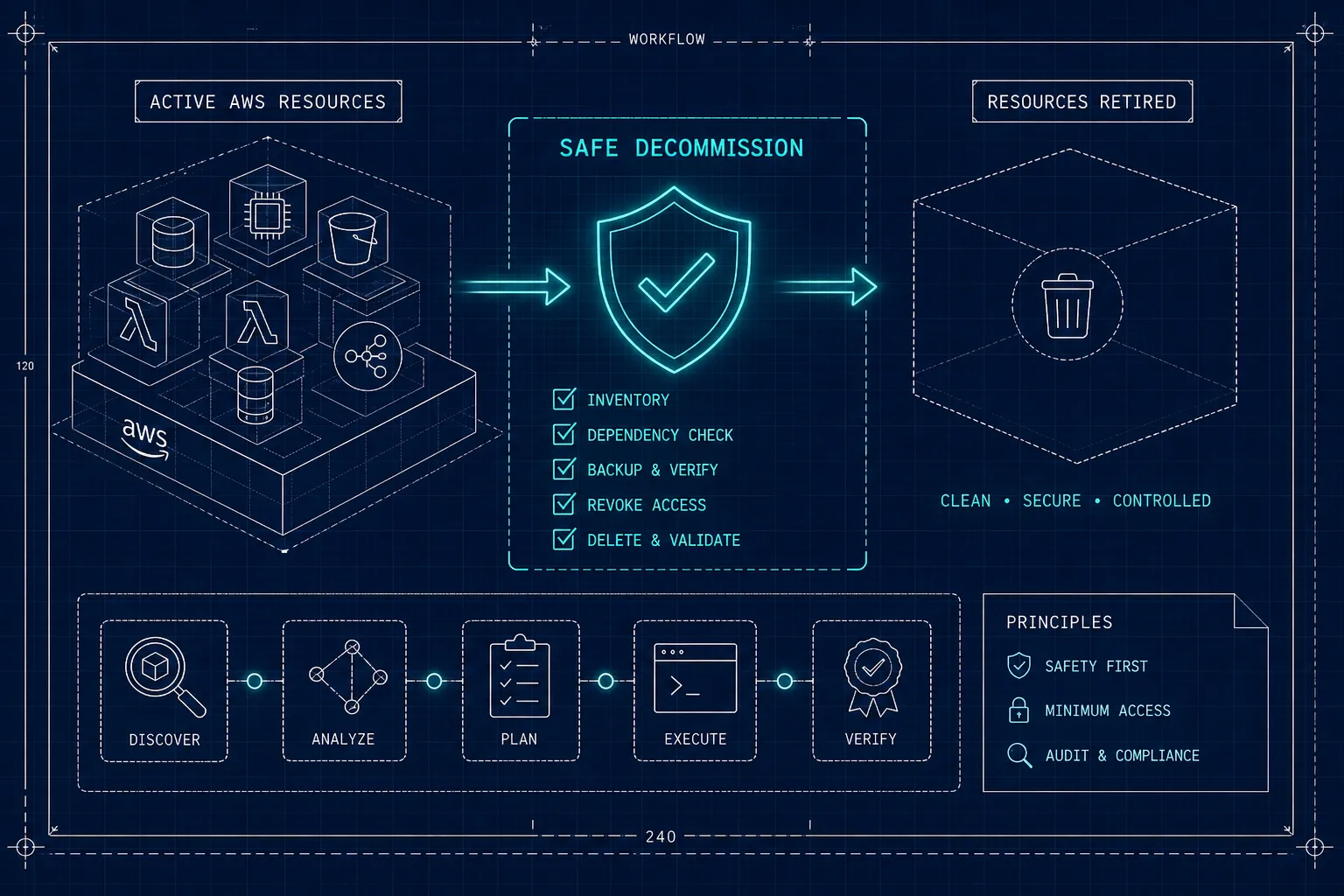
To decommission AWS resources safely, you need to finish six things before you delete a single resource: map its dependencies, confirm who owns it, assess the cost impact, create verified backups, follow the correct teardown order, and check that billing has actually stopped. A leading cause of decommission failures is skipping the dependency-mapping step.
This guide walks through each one in the order that matters, with the specific checks and commands that make the difference between a clean shutdown and a 2 a.m. incident. If you don’t yet have a list of what to decommission, start with Find Unowned AWS Resources in 30 Minutes and come back with the results.
The fundamental challenge is that AWS resources rarely exist in isolation. A security group might be shared across three services. An ENI might still be attached to a Lambda function running in a VPC. An RDS instance’s automated backups disappear when the instance is deleted unless you explicitly retain them. Teams that skip the dependency-mapping step learn this the hard way.
Key takeaways
- Map before you delete. Hidden dependencies are the leading cause of decommission failures. Use AWS Config, Resource Explorer and CloudTrail together to build a full picture before any deletion.
- Confirm ownership. When no one knows who owns a resource, use the quarantine-before-deletion pattern: disable, observe, then delete after a defined review window.
- Restore-test your backups. A snapshot that has never been restored is not a validated backup. Test recovery in an isolated environment before the original resource is gone.
- Sequence is not optional. Deleting in the wrong order creates orphaned ENIs, dangling security group references and broken CloudFormation states that are hard to recover from.
- Ghost billing survives deletion. EBS snapshots, Elastic IPs, NAT gateways and idle Secrets Manager secrets keep charging after workloads are removed. Watch Cost Explorer for at least 30 days afterwards.
- Build the evidence package. In regulated environments, auditors ask for approval sign-off, dependency maps, backup IDs and restore-test results. Assemble this record before you start deleting.
What usually breaks during an AWS decommission?
The most common failure is simple: a resource gets deleted while something upstream still depends on it. Security groups shared across several services, ENIs attached to Lambda functions, and Route 53 records still resolving to a terminated instance are the classic examples. AWS doesn’t always warn you when a delete will cascade into a consumer, so the failure shows up as a production alert rather than a deletion error.
Ownership gaps make this worse. In multi-account AWS environments, resources accumulate without clear lineage. An engineer creates an RDS instance, moves on, and three years later nobody knows whether anything still connects to it. That ambiguity is what turns a routine cleanup into an outage: there’s no one to ask before pulling the trigger. When there’s no owner, there’s no review, and the dependency check gets skipped entirely. We saw the same pattern in 89 idle Azure VMs left over from an acquisition: the team that built them had gone, and nobody on the current team could say what they were for.
There’s also a billing side that teams consistently underestimate. Decommissioning isn’t finished when the workload is gone. EBS snapshots keep charging. Elastic IPs that survive instance termination keep accumulating cost, and AWS has charged for every public IPv4 address since February 2024. Idle NAT gateways bill by the hour even when no traffic flows through them. If the full dependency tree isn’t audited, spend continues after the workload has disappeared, and nobody notices until the monthly bill arrives.
Step 1: Map dependencies
AWS provides three native tools that work well together as a starting point:
- AWS Config, with a configuration aggregator, centralizes inventory across accounts and regions.
- Resource Explorer supports organization-wide search, and its
tag:nonefilter is particularly useful for surfacing untagged candidates. - CloudTrail fills in the human layer: who created the resource, when it was last modified, and whether any principal has used it recently.
Config queries
The unattached EBS volume check is a good first query. It uses select-aggregate-resource-config, so one call covers every account and region the aggregator collects from:
aws configservice select-aggregate-resource-config \
  --configuration-aggregator-name org-aggregator \
  --expression "SELECT accountId, awsRegion, resourceId, configuration.state WHERE resourceType = 'AWS::EC2::Volume' AND configuration.state = 'available'"
Swap the resource type and filter to inventory whatever you’re about to decommission: instances in a given VPC, security groups, load balancers, and so on.
Resource Explorer
Resource Explorer is the quickest way to find resources with no user-defined tags at all, which are often the ones nobody can vouch for:
aws resource-explorer-2 search --query-string "tag:none"Run it against a view in your aggregator index to search across every indexed region (and, with an organization-wide view, every account).
The limits of native tooling
No single native inventory contains every relationship. Config covers supported resource types only, and it must be enabled and recording in every relevant account and region. Resource Explorer won’t tell you that a security group is referenced by a Lambda function in a different stack. That correlation has to be built by hand, by walking the dependency chain across ENIs, security groups, launch templates, target groups, Lambda event sources, IAM policies, KMS grants and CloudFormation stacks.
CloudTrail checks
CloudTrail answers “who made this, and is anyone still touching it?” Look up recent events for the resource in its own region:
aws cloudtrail lookup-events \
  --lookup-attributes AttributeKey=ResourceName,AttributeValue=sg-0abc123def4567890 \
  --query "Events[].[EventTime, EventName, Username]" \
  --output table
Event history only goes back 90 days. For older resources, query your CloudTrail trail in S3 with Athena. Who Created This AWS Resource? walks through both, including how to decode assumed-role and SSO sessions into a person.
Building this picture by hand is the gap Cloud Sleuth’s continuous inventory and topology is being built to close: a living inventory with relationship context across AWS accounts, showing which team owns each resource, what service it belongs to and what depends on it. For teams running multi-account AWS at any meaningful scale, having that context before decommissioning is the difference between a confident delete and a guess.
Step 2: Verify ownership before any deletion
Three signals tell you who owns a resource:
- Native tags:
owner,team,service,cost-center. - The CloudTrail create event (
RunInstances,CreateDBInstanceand so on), which identifies the IAM principal and timestamp. - Service catalog or CMDB records.
These signals frequently conflict or are missing altogether, especially for resources created years ago by engineers who have since left. When they do, work through the ordered rules in Find Unowned AWS Resources in 30 Minutes: stack or cluster, account, name pattern, creator, then neighbors. Write down every answer you find, so the next decommission doesn’t start from zero. That written record is what Cloud Sleuth’s ownership model is designed to keep current.
When you do identify an owner, put a formal gate in front of the deletion:
- The owner signs off explicitly.
- A retention period is defined and documented.
- A rollback window is agreed on.
In regulated environments, this approval becomes part of the compliance evidence package, and auditors treat a missing sign-off as a control failure whether or not the deletion caused any harm.
When there is genuinely no owner, use the quarantine-before-deletion pattern:
- Tag the resource as a decommission candidate.
- Stop or disable it.
- Set a review period of 7 to 30 days.
- Monitor for dependency failures or unexpected access attempts during that window.
- Delete only after silence.
This approach isn’t perfect, but it’s far safer than assuming that the absence of a tag means the absence of a consumer. For a worked example, see how seven abandoned Azure SQL databases were verified as unused before anyone deleted them.
Step 3: Back up stateful resources and protect your rollback window
RDS
- Stop writes.
- Create a manual final snapshot.
- Copy it cross-account and cross-region if required.
- Export it to S3 for long-term portability.
- Disable deletion protection only once the sign-off is in hand.
One critical detail: RDS automated backups are deleted with the instance unless you explicitly retain them, and retained automated backups only last for the instance’s backup retention period. Manual and final snapshots are independent of the instance, so those are what you rely on for recovery. When you delete the instance, take the final snapshot and keep the automated backups in the same call:
aws rds delete-db-instance \
  --db-instance-identifier orders-db \
  --final-db-snapshot-identifier orders-db-final-2026-10-22 \
  --no-delete-automated-backups
EBS
Quiesce writes and flush the filesystem before creating the snapshot. Copy critical snapshots to a dedicated AWS Backup vault in a separate account. Set up Recycle Bin retention rules for EBS volumes and snapshots as a short-term safety net against accidental deletion.
S3
Enable versioning before you begin, replicate to a separate account and region, export an archive, and validate object counts and checksums before emptying the bucket. Never empty a bucket without confirming the replica is readable from the destination account.
Not every unused bucket needs deleting. In 23.2 TB of inactive S3 data, access analysis and owner interviews moved the data to Glacier Deep Archive without deleting a file.
Restore-test everything
The step most teams skip is the restore test. A backup that has never been restored is not a validated backup. Before deleting any stateful resource:
- Restore the RDS snapshot to an isolated instance.
- Create a volume from the EBS snapshot and mount it on a test instance.
- Confirm the KMS key is usable from the recovery account.
- Verify that the IAM roles, security groups and parameter groups needed for recovery are documented and accessible.
A restore test is the only signal that a backup actually works. Everything else is optimism.
Step 4: Tear down in the right order
AWS resource deletion follows a dependency direction: remove what depends on the core resource first, then the core resource, then shared infrastructure. Deleting in the wrong order orphans ENIs, leaves dangling security group references, breaks CloudFormation stack states, and can leave an account partially decommissioned in a way that needs manual intervention to recover.
Work in these layers:
- Traffic and routing first. Lower Route 53 TTLs in advance, then remove Route 53 records, ALB listeners and rules, target groups, API Gateway integrations, EventBridge rules and Lambda triggers.
- Compute next. Stop EC2 instances, drain EKS workloads, disable Lambda event-source mappings, and terminate instances after AMI and snapshot validation.
- Storage after compute. Detach and delete EBS volumes after snapshot validation, empty and delete S3 buckets, and delete RDS instances while retaining the final snapshot.
- Networking. Remove NAT gateways and VPC endpoints first. Then remove VPN and Transit Gateway attachments, peering connections, the internet gateway, subnets and route tables. Remove security groups next, and delete the VPC last.
- IAM and CloudFormation last. Disable access keys, remove roles and policies after migration, and delete CloudFormation stacks after verifying
DeletionPolicy: Retainon any stateful resources.
Closing whole accounts
For Control Tower-managed accounts, unenroll the account first and wait for its status to show Not enrolled before you close it. If you close an enrolled account, Control Tower shows it as both Suspended and Enrolled for the 90-day post-closure period, re-registering its OU fails during that time, and you have to delete the account’s Service Catalog provisioned product by hand once the 90 days are up.
For Organizations-only accounts, remove any delegated administrator registrations, clean up account resources and subscriptions, then close the account centrally from the management account.
Step 5: Confirm the decommission is actually complete
Stopping a workload does not always stop the bill. After deletion, check Cost Explorer and the Cost and Usage Report for continued spend in the relevant account, region and service. Common survivors include:
- EBS snapshots
- Elastic IPs
- Unused Secrets Manager secrets
- Idle NAT gateways
- Orphaned load balancers
- Leftover CloudWatch dashboards
Set up AWS Cost Anomaly Detection on the account for at least 30 days after the decommission, so any residual spend is caught automatically.
The cleanup extends beyond AWS itself:
- Remove the resource from monitoring and alerting configurations.
- Deregister it from CMDB and service catalog records.
- Remove it from backup policies so scheduled jobs don’t run against deleted resources.
- Update DNS documentation and remove IAM Identity Center assignments.
Each of these omissions creates a quiet maintenance burden that accumulates over time.
Step 6: Assemble the evidence package
Before closing the record, assemble an evidence package containing:
- The approval sign-off
- The dependency map
- Backup IDs with restore-test results
- Retained-resource locations and expiry dates
- Encryption key identifiers
- A deletion timestamp for each resource
In regulated environments, this package is what auditors ask for first. Store it in a version-controlled location outside the decommissioned account, so it stays accessible after the account is closed.
Safe decommissioning is a process, not a delete operation
The teams that handle AWS teardowns well treat every deletion candidate as a question to answer before it becomes an action to execute. Map what depends on it. Confirm who owns it. Verify the backups restore cleanly. Follow the sequence. Get the order right and the cost savings and audit evidence follow.
Running Azure too? The same process applies there; the Azure orphaned resources guide covers finding orphans with Resource Graph, confirming they’re unused, and deleting with a snapshot and an audit trail.
If native AWS tooling isn’t giving you the dependency and ownership context you need to deprovision AWS services with confidence, that’s the gap Cloud Sleuth is being built for: a living ownership model with continuous inventory and topology across your cloud accounts. The free local tool will run in your own environment with read-only access, and Cloud Sleuth Cloud adds the full relationship graph across many accounts.
Both are pre-launch. Get early access to see how Cloud Sleuth fits into your decommission workflow, and to hear first when you can map resource ownership across your own AWS accounts.
Checklist
- Dependencies mapped with Config, Resource Explorer and CloudTrail, including cross-stack references
- Owner sign-off recorded, with retention period and rollback window, or quarantine period completed with no complaints
- Final snapshots and backups taken, copied out of the account, and restore-tested
- Teardown done in order: routing, compute, storage, networking, IAM and CloudFormation
- Control Tower accounts unenrolled before closure
- Cost anomaly monitoring set for at least 30 days, and residual spend checked
- Monitoring, CMDB, backup policies, DNS docs and Identity Center assignments cleaned up
- Evidence package stored outside the decommissioned account
Frequently asked questions
How long should we quarantine a resource before deleting it if no owner is found?
Set a review period of 7 to 30 days. During that window, stop or disable the resource, tag it as a decommission candidate, and monitor for dependency failures or unexpected access attempts. Delete only after silence.
What restore tests do we need to run to validate backups before deletion?
Run actual restores: restore the RDS snapshot to an isolated instance, create and mount a volume from each EBS snapshot, and confirm the KMS key is usable across accounts. Also verify that the IAM roles, security groups and parameter groups needed for recovery are documented and accessible, so recovery works end to end.
How long should we monitor billing after decommissioning to catch ghost charges?
At least 30 days. Use Cost Explorer and the Cost and Usage Report, and set up cost anomaly monitoring on the account for that period to catch survivors like EBS snapshots, Elastic IPs, idle NAT gateways and unused Secrets Manager secrets.
What do we do when ownership signals conflict or are missing for a resource?
Require an explicit owner sign-off and a formal retention and rollback window before deletion. If no owner can be identified, apply the quarantine-before-deletion pattern: tag the resource as a decommission candidate, disable it, observe it for the defined review period, and delete only if no dependent activity appears.